A To Be Seen product
Digital loyalty cards for Apple Wallet and Google Wallet.
Try the demo
Loyalty Pass · A To Be Seen product
Your customers loved their first visit.
Turn everyday purchases into lasting customer relationships with a simple digital rewards experience.
Sample card · Apple Wallet & Google Wallet
A first visit is a beginning. Loyalty Pass gives your customers a reason to come back, and gives you a clear view of who does.
Thirty seconds, three points of view. Join as a customer, stamp as the cashier, then read it all as the owner.
Step 1 of 9
Your customer spots the QR code on the counter at Harbour Café and points their camera at it.
Tap “Scan the QR code” on the phone.
Waiting for the next customer
Simulated in your browser, where everything stays. Figures in the owner’s view are demonstration data.
Your venue’s name, your colour, your reward. This is the card your customers would carry, and the code on your counter.
In their wallet
On your counter
A merchant app for the counter and the back office, and an admin workspace that follows every location.
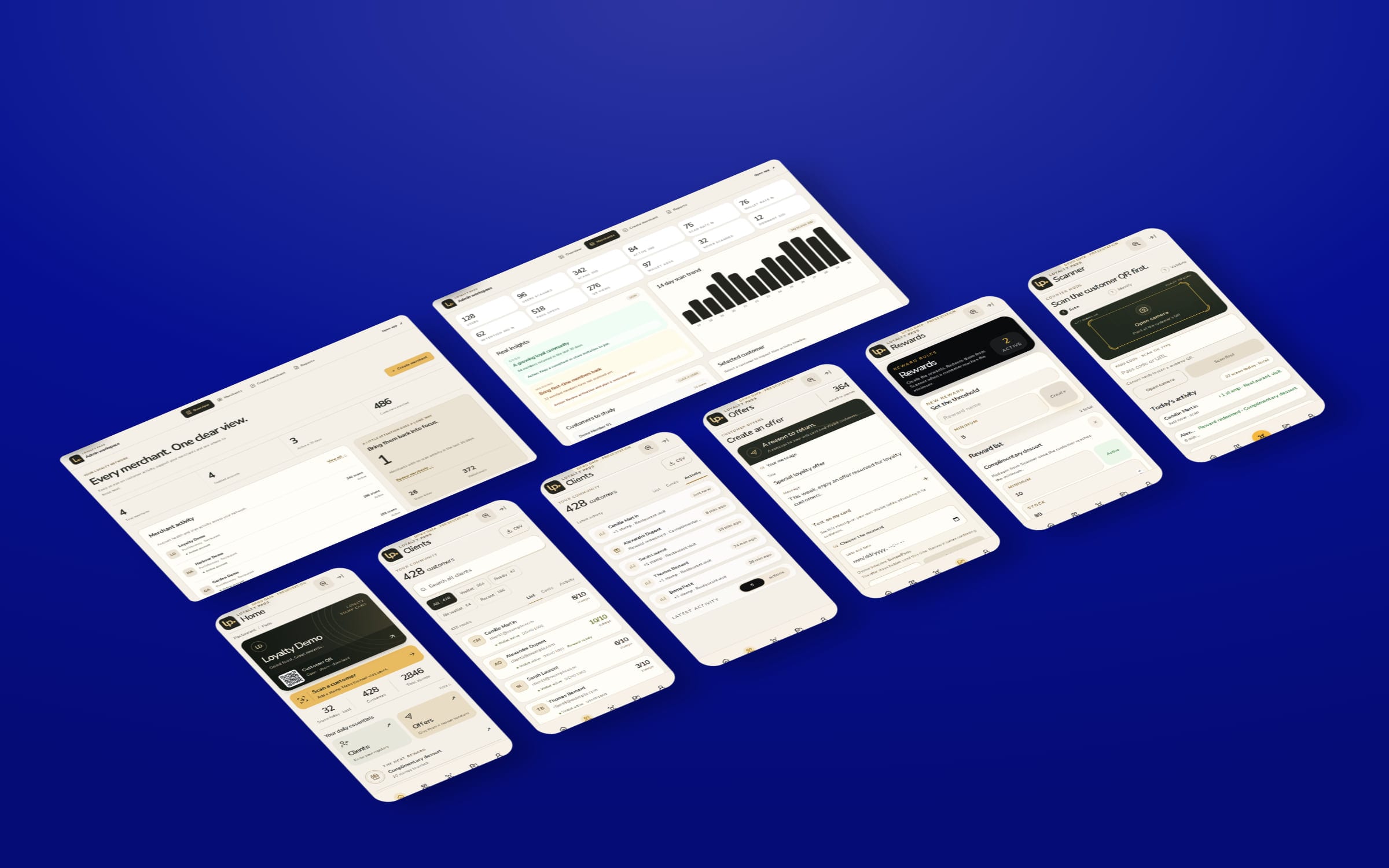
Counter mode scans the customer’s QR, identifies the card and validates the visit in three steps, by camera or pass code.
Every customer with their stamps, their Wallet status and the rewards ready to claim. Search, filter and export to CSV.
Write an offer for web card and Wallet customers, test it on your own card, then schedule it for the right moment.
Set the threshold and the stock; the reward is redeemed from the scanner once a customer reaches it.
Logo, colours and rewards are edited in one place and installed Wallet cards update automatically. Cashiers get a scanner-only login.
An admin workspace follows the whole network: activity, retention, Wallet adoption and a 14-day scan trend, with insights that suggest the next action.
| Paper stamp card | Loyalty Pass | |
|---|---|---|
| Where the card lives | In a wallet, a pocket, or the bin | In Apple Wallet or Google Wallet, on their phone |
| Joining | Ask for a card, find a pen | Scan a QR code at the counter |
| Each stamp | Easy to lose, easy to copy | Scanned and validated by your team |
| Your regulars | Anonymous | Every customer, their visits and their rewards |
| Bringing them back | Wait and hope | An offer on their card, scheduled for the right moment |
| Changing the reward | Reprint the cards | Edit it once: every card updates |
Every Loyalty Pass starts with a professional launch. We configure your rewards, adapt the card to your brand and onboard your team, so the program works from the first customer. Then one monthly subscription keeps it running.
One venue, launching its first digital loyalty card.
Setup + monthlyYour price is confirmed at the demo, once we know your venue.
Venues that want to bring customers back on purpose, at one location or several.
Setup + monthlyYour price is confirmed at the demo, once we know your venue.
Two plans, each a one-off launch fee and a monthly subscription.
They scan a QR code at your counter, give a name and an email, and add the card to Apple Wallet or Google Wallet, already on their phone. A web card is there for anyone who prefers it.
Either. Reward visits with stamps (a coffee after eight, a dessert after ten) or reward spending with points. We set up the one that suits your venue at launch.
A phone or a tablet with the merchant app. Cashiers get a scanner-only login: they scan the customer’s card, check it and add the stamp. For a card the camera finds hard to read, the cashier enters its pass code.
Yes. Rewards, thresholds, logo and colours are edited in one place, and the cards already in your customers’ wallets update automatically.
You do. Every customer, their stamps and their rewards are in your account, and you can export the list to CSV at any time.
Write an offer, test it on your own card, then schedule it for the right moment. It reaches every customer with a Wallet or web card.
A professional launch: we configure your rewards with you, adapt the card to your brand, prepare your counter QR and onboard your staff, so the program works from the first customer.
Yes, on Pro. One admin view follows every location: activity, retention, wallet adoption and the scan trend, with insights that suggest the next action.
We’ll prepare Loyalty Pass with your venue’s name, colours and an example reward, then walk you through it.